
A cruise is all about relaxing, enjoying ocean views, and taking a break from daily life. But many travelers still want reliable internet access to check in with family, respond to messages, or post updates on social media.
Carnival Cruise Line offers several WiFi packages that work even when your mobile network doesn’t. Each plan provides different speeds and access levels, so you can choose the one that fits your needs without paying for features you won’t use.
Keep reading for a full breakdown of Carnival Cruise WiFi plans, pricing, and what each package includes.
How Much is WiFi on Carnival Cruise?
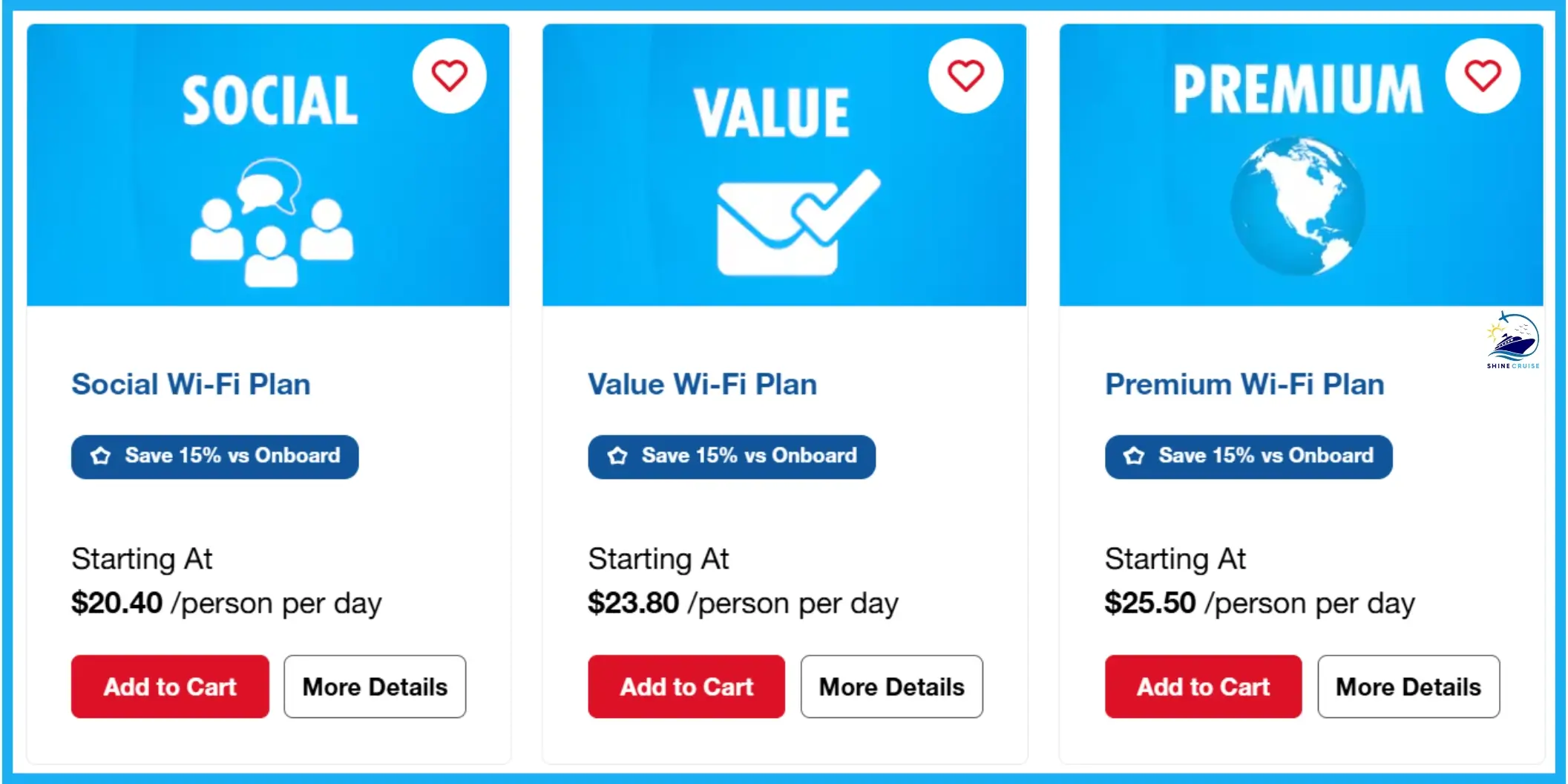
Carnival Cruise Line offers four WiFi packages to fit different needs and budgets with prices ranging from $20.40 to $90 per day. If you book before boarding, you can save 15% on Social, Value, and Premium plans, or 25% on the Multi-Device Premium plan.
The basic plan lets you stay active on social media, while higher-tier options give you faster speeds for streaming, browsing, and staying in touch.
Note: Carnival Cruise line has updated the internet policy. Now you need to purchase a Carnival WiFi packages for the entire cruise. Previously, you could buy it for specific days while on board, but that is no longer an option.
Carnival Cruise WiFi Packages
Carnival Cruise Line has 4 different Carnival Wifi packages:
Carnival Cruise offers 24-hour Wifi plans which can be purchased on board and are only available for value and premium plans if you need internet access for just a few days. Carnival Cruise line offer “per person, per day” WiFi services at standard prices.
| Carnival Cruise Intrenet Packages | Price Before Cruise | Price Onboard |
|---|---|---|
| Social Plan | $20.40 per day | $24.00 per day |
| Value Plan | $23.80 per day | $28.00 per day |
| Premium Plan | $25.50 per day | $30.00 per day |
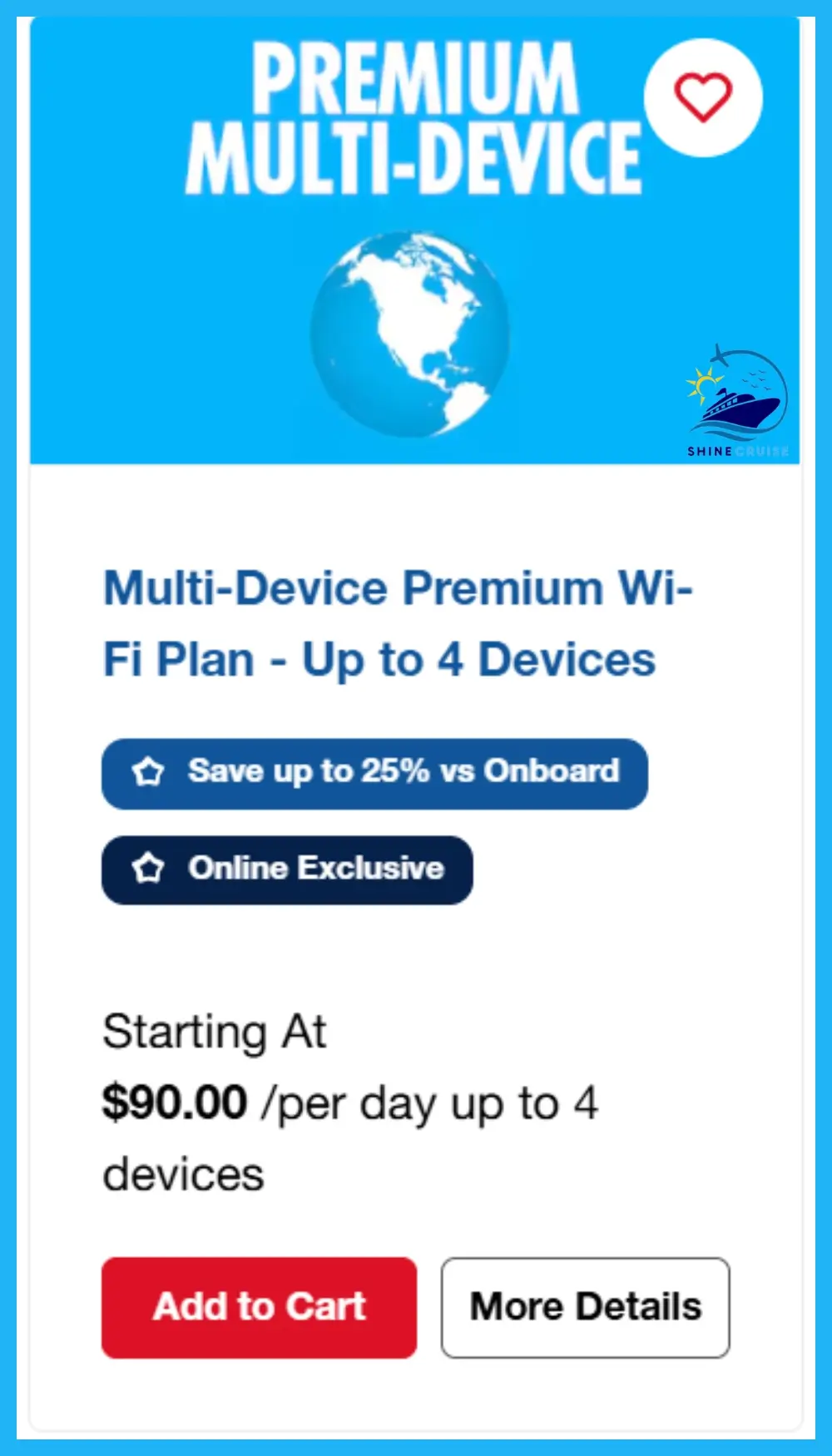
| Multi-Device Premium Plan | $90.00 per day | $120 per day |
The Carnival WiFi packages and their details are discussed below:
Carnival Social Plan
Carnival Social WiFi Plan costs $20.40 per day if purchased before your cruise, with savings of up to 15%. Onboard, the same plan costs $24 per day. For a 6-day cruise, booking in advance will cost $122.40 per person, compared to $144 if purchased on the ship.
The Social WiFi plan is Carnival’s most basic internet option. It provides access to popular social media platforms, including Facebook, Instagram, WhatsApp, Snapchat, TikTok, Pinterest, X (formerly Twitter), Reddit, and LinkedIn. You can also visit major airline websites.

Most other websites are blocked, including email services, video and music streaming platforms like Spotify, Netflix, and Hulu, and WiFi calling features that rely on cellular networks.
This plan is designed to keep you connected to your social networks while limiting access to other online content and services.
Carnival Value WiFi Plan
The Carnival Value WiFi plan lets you browse email, stay updated with news and sports headlines, and enjoy faster connection speeds compared to the Social plan.
Like the Social plan, you can save up to 15% if you purchase the Value plan before your cruise. It costs around $23.80 per day when prepaid, and $28 per day if purchased onboard. For a 6-day cruise, this WiFi package costs $142.80 when booked in advance and $168 onboard.

However, you cannot access video calling services like Zoom or Skype, or streaming apps such as Netflix and Spotify.
Premium WiFi Plan
The Carnival Premium WiFi package is the most advanced internet option on Carnival Cruise. It includes all features from the Social and Value plans, plus access to streaming services like Netflix, Hulu, and Spotify, and video calling apps such as FaceTime, Zoom, and Skype. With this plan, you can browse any website, stream movies, and video chat without restrictions.

The Premium plan costs $25.50 per day per person if purchased before your cruise, and up to $30 per day onboard. For a 6-day cruise, the total cost is $153 when booked in advance and $180 onboard.
Multi-Device Premium WiFi
The Multi-Device Premium WiFi plan offers the fastest connection on Carnival Cruise for up to 4 devices simultaneously. It includes all features of the Premium plan, such as high-speed internet, video and music streaming, and support for video calling apps like Skype, Zoom, and Microsoft Teams.
You can save up to 25% by purchasing this plan before your cruise. The plan costs around $90 per day, while the onboard price is about $120 per day.

This plan is ideal for families or groups traveling together, as it allows multiple devices to share one subscription, making it more cost-effective than buying separate Premium plans for each person.
How to Buy a Carnival Internet Packages?
Here are the ways to purchase Carnival Cruise WiFi package:
Buy Before Cruise
If you want to save on Carnival Cruise WiFi packages, it’s best to purchase your plan before your cruise. You can get a 15% discount on Social, Value, and Premium WiFi plans, and a 25% discount on the Multi-Device Premium WiFi plan. To take advantage of the discount, make sure to book your WiFi plan before 11:59 PM EST on the day before your departure.
To book, simply visit Carnival.com, click on the Manage tab, and select My Booking to add a WiFi plan to your cruise.
Onboard Your Cruise
If you didn’t purchase a Carnival Cruise WiFi package before your cruise, don’t worry, you can still buy one onboard. To access WiFi during your cruise, simply turn on WiFi on your device and go to your WiFi settings. Instructions for selecting and purchasing a WiFi plan will appear on your screen, making it easy to get connected while at sea.
How Does Carnival WiFi Work?
Carnival WiFi works through a satellite-based system that provides internet access while at sea. To use it, you can choose from different plans to get access, depending on how much data you need.
Once you purchase a plan, you can connect your device to browse the web, use social media, or access email depending on your chosen plan. The speed and reliability can vary based on the ship’s location and weather conditions and the package you purchased.
Remember to switch your device to airplane mode and then turn on WiFi to avoid unwanted roaming charges.
How To Connect to Carnival WiFi?
To connect to Carnival WiFi, you have to open WiFi settings on your device and find a network named Carnival WiFi or it may appear after your ship name such as Carnival Jubilee WiFi. Once you’re connected to this network, you’ll be directed to a webpage where you can enter your details and connect.

You can also visit carnivalwifi.com for the same page if the above-mentioned steps do not work. Guest services are also available to solve these problems if you are unable to connect.
On How Many Devices You can Use Carnival Internet Package?
Carnival Cruise Line offers a Multi-Device Premium WiFi plan that allows up to four devices to connect to the internet simultaneously, providing better connectivity for passengers during their cruise.
Other Carnival WiFi packages, including Social, Value, and Premium plans, are limited to one device at a time. These internet packages are sold on a per-person basis, not per device.
If you want to use the WiFi on multiple devices, such as a laptop and a smartphone, you must disconnect from one device before connecting with another.
How Fast is Carnival WiFi?
The Internet speeds can vary widely on different Carnival Cruise ships. Newer Carnival ships have a more advanced network (5G) which allows multiple passengers to use the Internet at once.
Newer cruises can reach up to 50mbps while older ships offer speeds around 20mbps. Even the speed of 90+ mbps Carnival Celebration and 100+ mbps on Carnival Jubilee is reported. Carnival Jubilee is Equipped with 5G mobile Connectivity
Passengers can experience speeds of 30 to 50mbps after Starlink collaboration with Carnival cruise. Traditional Internet access not only has speed issues but also latency problems.
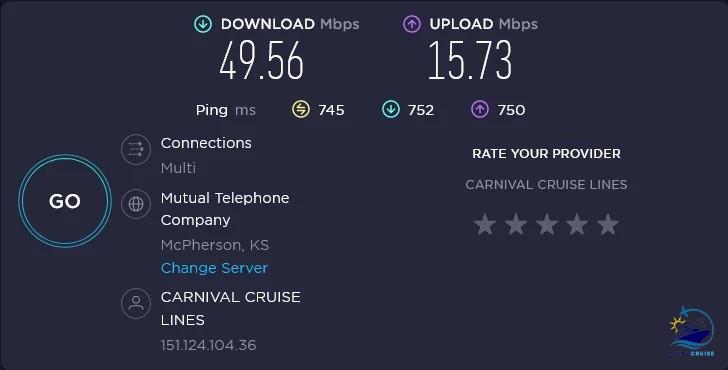
Ping speed is slower and ranges from 150 to 180 ms on standard cruise WiFi network which causes buffering and frustration for users.
Starlink has solved this problem. Average ping speed of around 20 to 35 ms is observed in recent speed tests. You can stream Netflix and Amazon Prime videos without buffering.
How to Change or Upgrade Carnival Internet Package During Cruise?
You can change or upgrade your Carnival WiFi package onboard at any time if you have already purchased the plan.
You have to visit the Guest Services desk on the ship, and they’ll help you in switching to a different Carnival Cruise WiFi Package if you need to change the plan.
How to Get Free WiFi on Carnival Cruise?
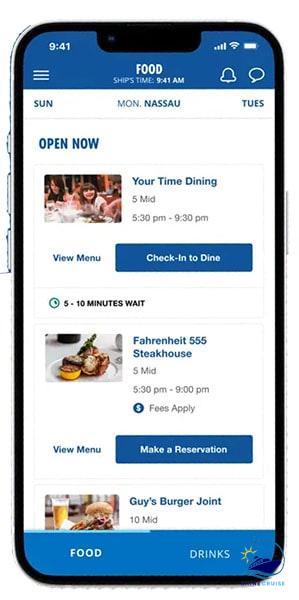
Carnival Cruise doesn’t offer completely free WiFi, but there are ways to reduce costs and maximize your internet access. All Carnival ships provide limited free WiFi through the Carnival Hub App, which helps you navigate the ship, view dining menus, and book onboard services. For full internet access, you will need to purchase a WiFi package.
Other ways to access free WiFi on cruise ships without purchasing it:
- Share a Carnival Cruise WiFi package with a fellow cruiser if they bought one.
- Ask crew members for help or tips to get online.
- When in port, find bars or cafes with free WiFi.
Consider purchasing a WiFi package before your cruise to take advantage of pre-booking discounts. Some loyalty programs or special promotions might offer free WiFi as a perk.
The Alternative of Carnival Cruise WiFi (Carnival Hub App)
There is nothing to worry about if you do not purchase the wifi package. You can use the Carnival Cruise WiFi for free but only free access is Carnival Hub App. This means you won’t be able to browse other websites or check your emails.

Carnival Hub App is completely free and you should download Hub App before you get on board. This app provides useful information about ships, such as entertainment schedules, theme parties, and deck plans. You can also check other aminities on cruise ship via this app.
Does Carnival Cruise have Starlink?
Carnival Corporation collaborated with Starlink Internet to improve the onboard Internet experience. Starlink, created by Elon Musk, offers faster satellite-based Internet at a lower cost and higher speed.

There is noticeable improvement in download and upload speeds after Starlink collaboration with cruise lines. Before purchasing a Carnival Cruise WiFi Package, you should confirm whether your ship has switched to Starlink, especially if you’ve experienced problems with cruise WiFi previously.
Impact of Starlink
Fast Speed & Reliability: Starlink provides faster and more reliable internet for passengers, improving streaming, video calling, and web browsing.
Broad Coverage: Starlink’s satellite network provides reliable internet even in remote cruising areas.
Reduced Latency: Starlink’s low orbit satellites reduce latency and improve the online experience, especially for real-time applications.
Is Starlink Available on All Carnival Ships?
In May 2024, Carnival Corporation has announced that Starlink is enabled on all Carnival Ships in their fleet:
- Carnival Firenze
- Carnival Jubilee
- Carnival Venezia
- Carnival Celebration
- Carnival Radiance
- Carnival Luminosa
- Mardi Gras
- Carnival Panorama
- Carnival Sunrise
- Carnival Horizon
- Carnival Vista
- Carnival Sunshine
- Carnival Breeze
- Carnival Elation
- Carnival Magic
- Carnival Dream
- Carnival Splendor
- Carnival Freedom
- Carnival Liberty
- Carnival Valor
- Carnival Miracle
- Carnival Glory
- Carnival Conquest
- Carnival Legend
- Carnival Pride
- Carnival Spirit
- Carnival Paradise
Which Carnival WiFi Package Should I Buy?
The best Carnival WiFi plan depends on your needs and how you plan to use the internet during your cruise. For passengers who want the fastest speeds for streaming movies, making video calls, or browsing multiple websites, the Premium plan is ideal.
If you only plan to use social media and casual browsing, the Social plan is more affordable and provides access to popular platforms like Facebook, Instagram, and WhatsApp.
Families or groups traveling together may find the Multi-Device Premium plan the best option, as it allows up to four devices to connect simultaneously. This makes it more cost-effective than purchasing separate Premium plans for each person.
When choosing a Carnival WiFi package, consider how much internet you will use, the activities you want to do online, and whether you need to share access with others. This will help you select the plan that best fits your personal or family needs.
Does Carnival Cruise Line Allow use of VPN?
Many people are concerned about using VPNs (Virtual Private Network), especially when trying to connect to cruise ship networks while doing their office work.
Carnival Cruise line claims that their WiFi is secure, that’s why Carnival prohibits the use of VPNs on their WiFi packages.
Carnival Cruise WiFi Package Tips & Tricks
Here are some tips for Carnival Cruise Internet Plans:

- Pre-Purchase Carnival Cruise WiFi Package for discount.
- Take advantage of free WiFi when Cruise Ship dock at ports.
- Share WiFi package with friends and family, but avoid mutual connections (1 person at a time).
- Purchase Carnival Hub App Chat service. It costs $5 if you want to keep in touch with your family.
- Turn on airplane mode on your phone and turn on WiFi to use the ship’s WiFi without roaming charges.
Is Carnival Cruise WiFi Worth it?
Your needs will decide whether it’s worth the money or not. The Carnival Internet prices exceed what we usually pay at home. If you need the wifi for some important reason you can purchase a 24-hour plan on days when you’re at sea.
On days when you’re at port, you can take advantage of free WiFi available in local bars or restaurants.
FAQs – Carnival Cruise WiFi Packages
Does Carnival WiFi Offers Discount?
Carnival Cruise Line does not provide discounted or sale prices for their WiFi. But you can get a 15% discount if you purchase the Carnival cruise WiFi packages in advance before you board.
Can I Use the Cellphone Data on Cruise Ship to Access the Internet?
It’s not recommended to use cellphone data on a cruise ship because maritime networks can trigger extremely high roaming charges. To stay connected safely, keep mobile data off and use the ship’s Carnival WiFi instead.
Is AT&T Cruise Plan Worth it on Carnival Cruise?
Yes, it totally worth it depending on your personal need. AT&T offers a plan called the AT&T Cruise Package.
Does the Cruise Ship have WiFi Coverage Everywhere?
WiFi access is not confined to certain areas on board, it’s accessible everywhere, including your stateroom.
Can I Get Free WiFi at Princess Cay and Half Moon Cay Private Island?
No, carnival guests are unable to get free wifi access at both Princess Cays and Half Moon Cay.
Can you visit Blocked Websites with Carnival WiFi Plans?
You cannot access certain blocked websites with Carnival WiFi plans, such as gambling or adult sites, as these restrictions ensure safe browsing for guests of all ages. All other websites, including social media and most informational sites, are accessible depending on your chosen WiFi package.
Can We Use Public Computer on Carnival Cruise Ships?
If you didn’t bring your laptop and need desktop access. Carnival cruise line has public computers on board. You can go to Ship’s Internet Cafe for desktop access.
Can You Facetime on Carnival WiFi?
Yes, you can facetime on Carnival Cruise with premium and multi-device premium plan.

- NCL The Local Menus for 2026 with Reviews and Tips - March 31, 2026
- Carnival Seaday Brunch Menu 2026 for all Ships with Tips - March 28, 2026
- Carnival Emeril’s Bistro 1397 Menu for 2026 with Reviews - March 7, 2026